How to Enable Hibernate on Ubuntu 26.04 LTS
A bootloader mystery, a TPM side quest, and the satisfaction of learning more about your machine
In my 20+ Linux years, there’s always one feature that takes a lot of system gymnastics to make it work: Hibernate. I had time in the early days, but as responsibilities started to pile up, I no longer had the resources to hack hibernate into every new OS version I installed. Until…
Agents. No, not those secret agent sleuth types. LLM/AI agents. I saw their power to create websites from scratch. But their skills are not just for coding. Anything inside the computer, they can do it with superpowers. When I did systems administration before, I would Google what needs to be done, copy+paste the commands, and apply them myself in the terminal. Now agents can do all that on their own: scan 20 web pages in parallel related to the problem, find the best solution, and apply it right away on the system. Times have changed.
Because they are so good at it, what previously took two weeks to set up a fresh Ubuntu to my liking, now only took just a day. Seven agents, all doing work in parallel, instructed on what their tasks were, adeptly doing their thing. And what was one agent’s job? Hibernate.
It tackled questions such as: Can this Ubuntu 26.04 LTS laptop hibernate properly? What exactly changes in EFI variables when I press Enter in systemd-boot? Why does LoaderConfigTimeoutOneShot=0 behave differently from persistent timeout 0?
Did you understand those questions? ☝️ I didn’t. Nor did I have to. The agent answered them, the agent applied them. ⚠️ Warning: the rest of the content below isn’t 100% mine. You wanna guess…? OK, OK, I’m sure you know the answer. 😅
The hibernate adventure begins
This turned out to be a digital detective story. “We” did ship something useful in the end: a helper script called ubuntu-hibernate. But the good part was not just shipping the tool.
The good part was following the clues.
So treat this as two things at once: a field report from one real laptop, and a safer starting point for your own Ubuntu 26.04 hibernate setup. The script can check and configure the conservative parts. The story explains why I do not trust a hibernate setup until the machine has actually gone to sleep, powered down, and come back with its memory intact.
The machine on the bench
The patient was not a generic laptop in a vacuum. The hardware and boot path mattered a lot:
| Piece | Detail |
|---|---|
| Laptop | System76 Gazelle, model gaze16-3050 |
| Firmware | coreboot on a UEFI system |
| OS during testing | Ubuntu 26.04 LTS, kernel 7.0.0-14-generic |
| Bootloaders | systemd-boot as the default resume-test path, with GRUB still installed as fallback |
| Graphics | Intel Tiger Lake-H integrated graphics plus NVIDIA GeForce RTX 3050 Ti Mobile |
| GPU mode | Hybrid/on-demand graphics, so the NVIDIA path could still matter even when the desktop felt Intel-first |
| Storage | NVMe drives, encrypted root, and a persistent swap partition |
| Memory and swap | About 15 GiB RAM, about 20 GiB swap |
| Unlock path | Encrypted root using LUKS, with TPM-backed Clevis unlock in early boot |
That mix is important. Hibernate is not just “does Linux support suspend-to-disk?” It is “can this exact firmware, bootloader, encrypted storage stack, swap device, initramfs, and graphics setup survive a full power-off and come back with the old memory image?”
On a different machine, the interesting failure may be somewhere else. On this one, the trail ran through TPM unlock, bootloader timing, and NVIDIA.
The first clue: hibernate is not one switch
On Linux, “enable hibernate” sounds like a checkbox. It is not a checkbox. It is a hallway with several doors, and each door has a small sign that says “probably fine.”
You need the kernel to support it:
cat /sys/power/state
cat /sys/power/disk
You need systemd-logind to believe it is allowed:
busctl get-property \
  org.freedesktop.login1 \
  /org/freedesktop/login1 \
  org.freedesktop.login1.Manager \
  CanHibernate
You need persistent swap that can hold the hibernate image. Not zram. Not a swap target that gets a fresh random encryption key every boot. Something early boot can find again:
swapon --show
cat /proc/swaps
You need the initramfs to know where to resume from:
cat /etc/initramfs-tools/conf.d/resume
lsinitramfs /boot/initrd.img-$(uname -r) | grep -E 'resume|cryptroot'
You need the boot path to pass that information early enough.
And if the disk is encrypted, the early boot environment needs to unlock enough of the storage stack before it can even look for the sleeping image.
So yes, “hibernate” is a feature. But it is also a contract between firmware, bootloader, kernel, initramfs, swap, encryption, systemd, desktop policy, and graphics drivers.
That is not a checkbox. That is a committee.
The TPM side quest
Before hibernate could be trusted, boot needed to be boring. A hibernate resume path is only as good as the boot path that can reach it.
The machine had TPM-backed unlocking for the encrypted root disk. It had failed before. Then it started working. That meant the right next question was not “cool, done” but:
Will this still work after a kernel update?
Because if the unlock path only exists in today’s initramfs, tomorrow’s kernel might boot into a tiny early-userspace room with no keys, no tools, and a very rude prompt.
So we checked the pieces:
lsinitramfs /boot/initrd.img-$(uname -r) | grep -E \
  'cryptroot|clevis|clevis-decrypt-tpm2|jose|askpass|cryptsetup'
The lesson was simple: a working boot today is evidence. A rebuilt initramfs with the right helper tools inside is persistence across kernel updates.
That little distinction matters. Linux will happily let you build a bridge that works exactly once.
The hibernate button that lied politely
After the boot path looked sane, hibernate appeared possible:
systemctl hibernateAt first, the result was not exactly poetry. The screen went dark, came back too quickly, and then the system asked for disk unlock in a place where the passphrase did not work. That is not the relaxing “see you after lunch” energy I want from hibernation.
The first big lesson:
Seeing a hibernate menu item does not mean hibernate works.
The second:
Seeing
PM: hibernation: hibernation entryin logs does not mean the image was written.
The logs matter. The useful checks were things like:
journalctl -b -1 -k -g 'PM:|hibernate|resume|swsusp'
journalctl -b -0 -k -g 'PM: Image|resume|swsusp'
The difference between “started hibernating” and “actually wrote a resume image” is the difference between “I opened the book” and “I read the chapter.”
Computers, like humans, can perform confidence.
Enter the bootloader mystery
On this machine, we moved from GRUB to systemd-boot for the bootloader because it was more stable for resume consistency. That was not because GRUB is bad. GRUB stayed installed as an escape hatch.
The machine powers down. Firmware starts from scratch. The UEFI boot entry runs. The bootloader picks a kernel. The initramfs unlocks encrypted storage. The kernel finds the old memory image in swap. Any missed handoff can turn “resume” into “fresh boot, no image found.”
For this experiment, systemd-boot made the path easier to reason about. It gave us a small, explicit UEFI entry, a hold-Space recovery path, and Boot Loader Interface variables we could inspect and tune. GRUB was still useful as a fallback, but its moving parts made this particular one-shot resume path harder to keep boring.
Then the timer behavior got interesting.
Persistent config:
timeout 0One-shot EFI variable:
LoaderConfigTimeoutOneShot=0Those looked like cousins. Maybe siblings. Maybe the same thing wearing different shoes. But they did not behave the same on this machine.
With persistent timeout 0, the boot path could skip the menu and continue cleanly. But the one-shot 0 case showed the systemd-boot menu and waited. No countdown. No graceful little “I got this.” Just a boot menu staring contest.
So we did the noble scientific thing: we started number hunting.
10 seconds: worked
5 seconds: worked
2 seconds: worked
1 second: not good enough here
0 seconds: definitely not the same behavior
Was 2 seconds a universal truth? Of course not. This is firmware land. But it was a satisfying clue. This firmware needed a tiny pause in the one-shot path. Not ten seconds. Just enough time for the firmware, bootloader, and resume path to agree that reality existed.
The NVIDIA alley
Then came NVIDIA.
Hibernate on integrated graphics worked. NVIDIA hybrid mode was the alley with flickering lights.
We tried the usual suspects:
- driver path
- NVIDIA GSP firmware behavior
- NVIDIA sleep services
- video memory preservation
- hibernate from the graphical session
- hibernate from TTY after logging out
At one point the phrase “GSP heartbeat” entered the investigation, which sounds less like a driver log and more like a cyberpunk medical diagnosis. But the logs kept pointing to the same basic shape: the failure happened before a proper hibernate image was written. The next boot would say there was no image to resume.
That matters because it tells you where not to keep digging. If the image never gets written, then a resume-side fix cannot be the whole answer. One of the best debugging skills is learning when your favorite theory has failed.
After trying so many times, we never made hibernate work while NVIDIA was up.
xkcd please?
Technical projects have a funny way of moving the finish line from “this will be easy” to “please let the machine return to the state it was in before I became curious.”
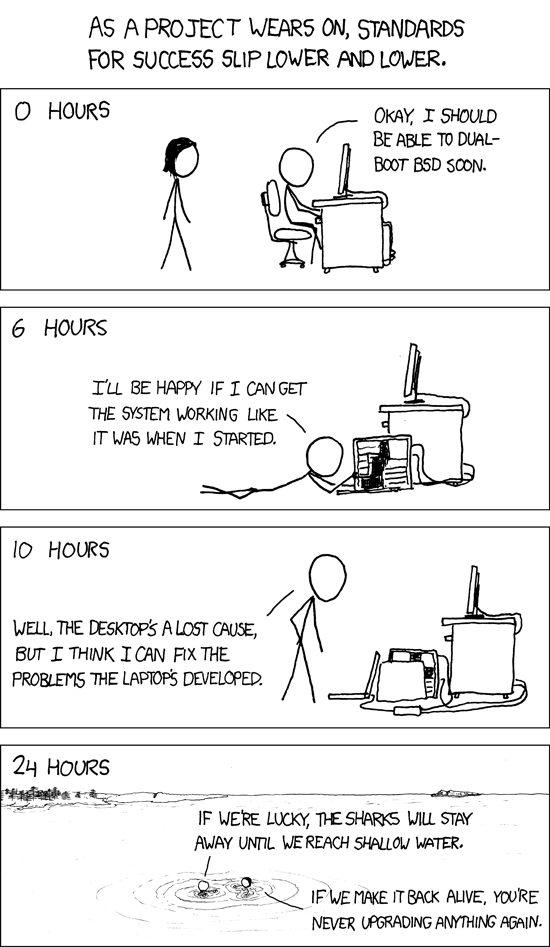
Thankfully, we did not end there. The machine kept booting. TPM unlock kept working. Intel hibernate worked. systemd-boot with a small one-shot timeout worked. NVIDIA hibernation remained the suspicious character at the edge of the scene, but that will likely be the main character in part 2.
The script that came out of it
The result is ubuntu-hibernate, a small guided helper for Ubuntu 26.04 LTS.
It is not a magic wand. It is more like a careful friend who says: “Let us look first.” The safe first command is:
./ubuntu-hibernate doctorIt checks the things I wish every hibernate guide checked before saying “just edit this file”:
- Ubuntu version
- kernel hibernate support
/sys/power/state/sys/power/disk- systemd-logind
CanHibernate - active swap
- whether swap looks persistent
- initramfs-tools resume support
- current resume config
- kernel command line clues
- encrypted swap warnings
- NVIDIA caution signs
It can also produce a report:
./ubuntu-hibernate report -o ubuntu-hibernate-report.md
./ubuntu-hibernate report --json -o ubuntu-hibernate-report.json
And if the machine looks like a conservative block-device swap setup, it can show the setup plan:
sudo ./ubuntu-hibernate setup --dry-runOnly after that do you apply:
sudo ./ubuntu-hibernate setupThe script backs up the files it touches under:
/var/backups/ubuntu-hibernate/And it has an undo path:
sudo ./ubuntu-hibernate undo --list
sudo ./ubuntu-hibernate undo <backup-id>
The first release intentionally does not edit bootloaders, including the systemd-boot and GRUB experiment above. It does not try to solve every swap-file resume-offset scenario. It does not claim NVIDIA hibernation is now a solved problem. It does not pretend firmware is deterministic. Restraint is part of the design.
Try it from GitHub
If you want to experiment, start with the source:
git clone https://github.com/majal/maj-scripts-vibe.git
cd maj-scripts-vibe
./ubuntu-hibernate doctor
Or fetch just the script for inspection:
curl -fsSL \
  https://raw.githubusercontent.com/majal/maj-scripts-vibe/main/ubuntu-hibernate \
  -o ubuntu-hibernate
chmod +x ubuntu-hibernate
./ubuntu-hibernate doctor
Please read what it says. The whole point is to make the machine explain itself before changing it.
The tiny checklist I trust now
If I were debugging a new Ubuntu 26.04 hibernate setup again, I would start with this mental checklist:
1. Does the kernel advertise disk hibernation?
2. Is there persistent swap large enough for RAM?
3. Is resume configured in initramfs?
4. Can early boot unlock whatever contains the resume image?
5. Does logind advertise hibernate after config is in place?
6. Can the system write an image and power down?
7. On next boot, did it resume or did it say "image not found"?
8. Can we make it work with a dedicated GPU like NVIDIA, or only with the onboard GPU?
The last line is not an insult. It is a weather report.
Why this was fun
The satisfying part was not that one command eventually worked. The satisfying part was that every failure taught something:
- a menu item can exist before the feature is reliable
- a kernel log can show the beginning without proving the ending
- a bootloader timeout value can reveal firmware timing behavior
- a working TPM unlock should be promoted into a persistent initramfs path
- a graphics-driver workaround is not a fix if the hibernate image never gets written
And maybe the most useful lesson:
Curiosity is not the opposite of shipping. Curiosity is how you learn what is safe enough to ship.
So yes, we made a script. But the better souvenir was learning from the trail of clues. That is the part I know other geeks would enjoy too. 😎